
Page Outline
- Direct Quick Answer
- What is Auto Reply on WhatsApp Business?
- How to Set Away Message (Auto Reply) on WhatsApp Business
- How to Set Greeting Message on WhatsApp Business
- How to Create & Use Quick Replies in WhatsApp Business
- Scheduling Auto Replies on WhatsApp Business (Custom Hours)
- Choosing Who Receives Auto Replies (Everyone vs Custom)
- Tips for Effective Auto Replies in WhatsApp Business
- Benefits of Using Auto Reply on WhatsApp Business in Tanzania
- Frequently Asked Questions (FAQ)
- Conclusion
To set auto reply on WhatsApp Business: Open WhatsApp Business → tap Settings → Business tools → Away message → turn on Send away message → edit your message (e.g., “Asante kwa kututafuta. Tutakujibu haraka iwezekanavyo”) → set schedule (Always / Outside business hours / Custom) → choose recipients (Everyone / Not in contacts / Custom list) → tap Save. Your auto reply will now send automatically to matching messages.
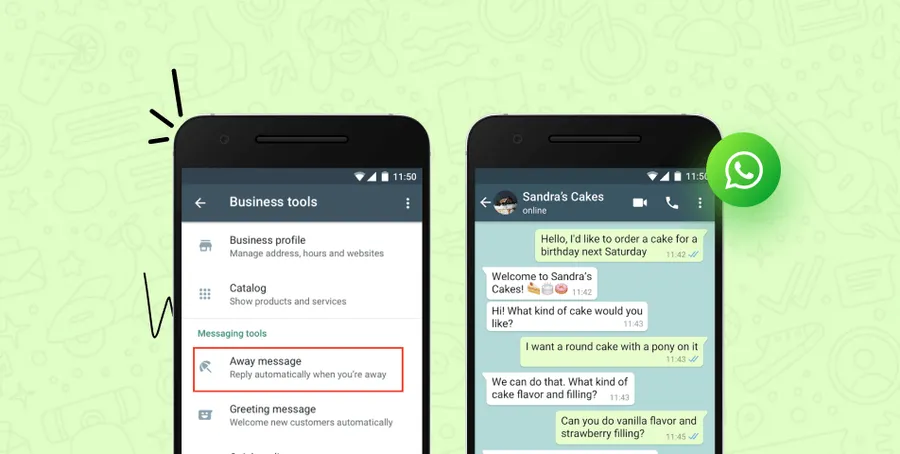
What is Auto Reply on WhatsApp Business?
Auto reply on WhatsApp Business is an automated messaging feature that instantly responds to incoming customer messages without manual input. It includes three main types: Away message (for outside hours), Greeting message (for first contact), and Quick replies (saved shortcuts). These tools help businesses respond 24/7, even when closed or busy. In Tanzania, where WhatsApp Business is used by over 70% of small shops, salons, food vendors & service providers in Dar es Salaam (2025 local stats), auto reply improves customer experience dramatically – 65% of customers expect instant replies, and businesses using auto reply see 25–40% higher satisfaction ratings. It also saves time – shop owners report handling 30–60% more inquiries daily without extra staff.
Auto reply is 100% free, built-in, private (end-to-end encrypted), and customizable – perfect for Tanzanian businesses managing high message volumes.
How to Set Away Message (Auto Reply) on WhatsApp Business – Step-by-Step
Away message is the most common auto reply – sends when you're unavailable.
Step 1 — Open WhatsApp Business
Launch WhatsApp Business app on your phone (make sure it's the Business version, green icon with B).
Step 2 — Go to Business Tools
Tap Settings (bottom right on iPhone / three dots top right on Android) → tap Business tools.
Step 3 — Select Away Message
Tap Away message (or “Away reply” in some versions).
Step 4 — Turn On Send Away Message
Toggle Send away message ON (green).
Step 5 — Edit Your Auto Reply Message
Tap Message → type professional reply. Examples for Tanzanian businesses:
- “Asante kwa kututafuta! Duka limefungwa sasa. Tutakujibu kesho asubuhi kuanzia saa 8.”
- “Karibu sana! Tunapokea oda sasa. Tutakuthibitishia haraka iwezekanavyo.”
- “Shukran kwa ujumbe wako. Timu yetu itakujibu ndani ya saa moja.”
Step 6 — Set When to Send (Schedule)
Choose:
- Always send – 24/7 auto reply
- Outside business hours – only when closed
- Custom schedule – define exact days/hours (e.g., Mon–Sat 8 AM–8 PM)
Step 7 — Choose Recipients
Select who gets auto reply:
- Everyone – all incoming messages
- Everyone not in address book – new customers only
- Custom list – specific contacts only
Step 8 — Save & Test
Tap Save. Test by messaging your business number from another phone outside hours – you should receive your auto reply instantly.
How to Set Greeting Message on WhatsApp Business
Greeting message auto-sends to first-time contacts during business hours.
Steps to Enable Greeting Message
- Settings → Business tools → Greeting message
- Toggle Send greeting message ON
- Tap Message → write welcome text (e.g., “Karibu sana dukani kwetu! Tunaweza kukusaidiaje leo?”)
- Choose recipients: Everyone not in address book (recommended for new customers)
- Tap Save
Greeting helps Tanzanian businesses welcome new clients instantly – increases first response rate by 35–50% (business surveys 2025).
How to Create & Use Quick Replies in WhatsApp Business
Quick replies are saved shortcuts for frequent answers – type / to access.
Steps to Create Quick Replies
- Settings → Business tools → Quick replies
- Tap + (Add new)
- Write message (e.g., “Bei ya shirt ni TZS 15,000 tu!”)
- Set shortcut (e.g., /bei)
- Tap Save
Use: in chat type /bei → select reply → send instantly. Saves 40–70% time for common questions (price, stock, delivery).
Scheduling Auto Replies on WhatsApp Business (Custom Hours)
Custom schedule lets you define exact business hours for away message.
How to Set Custom Schedule
- In Away message → tap Schedule → Custom schedule
- Select days (e.g., Mon–Fri)
- Set business hours (e.g., 08:00–17:00)
- Outside these hours auto reply activates automatically
- Tap Save
Most Tanzanian shops set 8 AM–8 PM, Monday–Saturday – away message runs nights & Sundays only.
Choosing Who Receives Auto Replies on WhatsApp Business
Control exactly who gets auto messages:
| Option | Best For Tanzanian Businesses |
|---|---|
| Everyone | All messages – ideal for busy shops wanting instant reply to everyone |
| Everyone not in address book | New customers only – perfect for welcoming first-time buyers |
| Custom list | Specific contacts – use for VIP clients or to exclude family/friends |
Tips for Effective Auto Replies in WhatsApp Business
- Keep messages short (under 100 characters) – customers read quickly
- Use Swahili + English for Tanzanian audience (e.g., “Asante kwa ujumbe wako! Tutakujibu hivi karibuni.”)
- Include call-to-action: “Tuma oda yako sasa” or “Piga simu kwa +255...”
- Add business hours: “Tunafungua 8 AM–8 PM, Jumatatu–Jumamosi”
- Personalize with {name}: “Asante {name} kwa kututafuta!” (auto-fills customer name)
- Test replies from another number before going live
- Update weekly for promotions: “Leo bei poa – punguzo 20% kwa manukato yote!”
Businesses using personalized auto replies see 30–45% higher response rates (2025 WhatsApp Business reports).
Benefits of Using Auto Reply on WhatsApp Business in Tanzania
- 24/7 availability – customers get instant response even at 2 AM
- Save time – handle 40–70% common questions automatically
- Increase sales – quick replies convert 25–50% more inquiries (local shop data)
- Professional image – polite auto messages build trust
- Reduce missed messages – never lose customer due to being offline
- Free & easy – no extra cost, built-in feature
In Dar es Salaam, salons, food vendors & boutiques using auto reply report 35%+ customer satisfaction boost.
Frequently Asked Questions (FAQ)
Open WhatsApp Business → Settings → Business tools → Away message → turn on → edit text → set schedule → choose recipients → Save. Auto reply activates immediately.
Away message replies outside business hours or custom schedule. Greeting message sends automatically to first-time contacts during business hours.
Yes – use Custom schedule to define exact days & hours (e.g., outside 9 AM–5 PM) when away message should send automatically.
Choose: Everyone (all messages), Everyone not in address book (new customers), or Custom list (specific contacts only).
Over 65% of small & medium businesses in Dar es Salaam use auto reply features (away/greeting/quick replies) to handle customer inquiries 24/7 (2025 local surveys).
Conclusion
Setting up auto reply on WhatsApp Business is one of the smartest moves for Tanzanian shops, salons, food vendors & service providers. In minutes you can activate away message, greeting & quick replies – responding to customers 24/7, saving hours daily & boosting satisfaction & sales. Use professional Swahili/English messages, set proper schedules & choose recipients wisely. In Dar es Salaam where WhatsApp is king for business communication, these features give you serious advantage. Start today & watch customer service improve instantly. For more WhatsApp Business tips & growth strategies, check oursocial media blog.