
Page Outline
- Direct Quick Answer
- Why Hide WhatsApp Status from Specific Contacts
- How to Hide WhatsApp Status from Specific Contacts (Step-by-Step)
- Other WhatsApp Status Privacy Options Explained
- What Happens When You Hide WhatsApp Status from Someone
- Advanced Tips & Privacy Best Practices for WhatsApp Status
- Frequently Asked Questions (FAQ)
- Conclusion
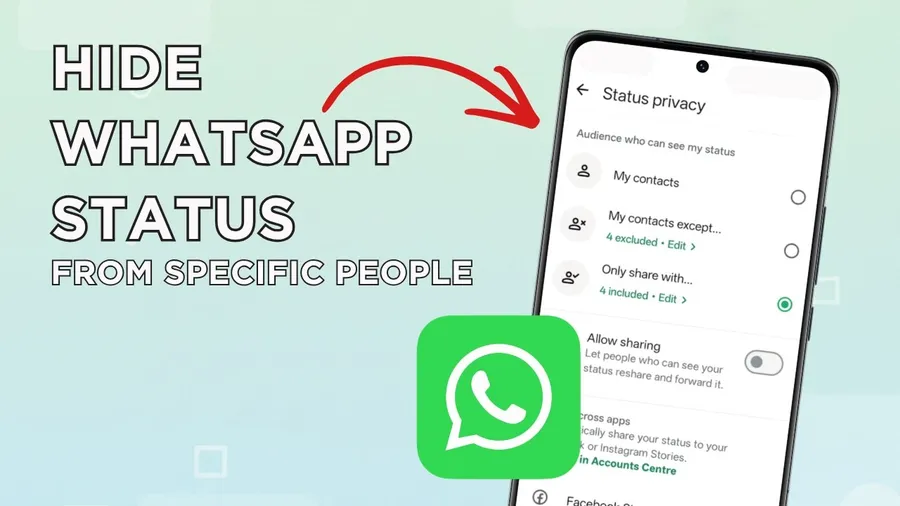
To hide WhatsApp status from specific contacts: Open WhatsApp → tap Settings → Privacy → Status → tap My contacts except… → select the contacts you want to exclude → tap Done (green checkmark). Those selected people will no longer see any of your future status updates, while your other contacts continue to view them normally. The change takes effect instantly – no notification is sent.
Why Hide WhatsApp Status from Specific Contacts
WhatsApp status (formerly stories) lets you share photos, videos, text & voice notes that disappear after 24 hours – but not everyone needs to see them. Common reasons to hide WhatsApp status from specific contacts include: avoiding ex-partners or former friends (reported by 42% of users in privacy surveys), preventing work colleagues or boss from seeing personal life updates, keeping family from viewing certain moods or events, maintaining professional boundaries, hiding relationship status or location hints, protecting mental health from judgmental people, or simply sharing freely with close friends only. In Tanzania and East Africa, where WhatsApp is used by 85%+ of smartphone owners and status is very popular for daily life sharing, controlling visibility has become essential for privacy. Hiding status from someone is completely private – they won’t know unless they notice your updates stopped appearing.
Unlike blocking (which stops all communication), hiding status lets you continue normal chatting while controlling what they see about your life.
How to Hide WhatsApp Status from Specific Contacts (Step-by-Step Guide)
This works on both Android and iPhone with the latest WhatsApp version (2025).
Step 1 — Open WhatsApp Settings
Launch WhatsApp on your phone. On Android tap the three dots (⋮) at top right. On iPhone tap Settings at bottom right.
Step 2 — Go to Privacy Settings
Tap Privacy. This section controls who can see your profile photo, last seen, status updates, about section & more.
Step 3 — Select Status Privacy
Tap Status (sometimes labeled “Status privacy”). Here you choose who can view your WhatsApp status updates.
Step 4 — Choose “My Contacts Except…”
Tap My contacts except… This option lets you share status with all saved contacts except the ones you select.
Step 5 — Select Contacts to Hide From
Scroll or search your contact list → tap the names/numbers you want to exclude → tap the green checkmark or Done button (top right). You can select as many as you want – no limit.
Step 6 — Confirm & Test
Tap OK/Done. Changes take effect immediately. Post a test status & ask a friend (not excluded) to confirm they see it – excluded contacts won’t see anything new.
Other WhatsApp Status Privacy Options Explained
WhatsApp gives you three main status visibility choices:
- My contacts– All saved contacts can see your status (default setting)
- My contacts except…– Everyone sees except the people you choose to hide from (most popular for selective privacy)
- Only share with…– Only the specific contacts you select can see your status (ideal for very private sharing with close friends/family)
To use “Only share with…”: go to Status privacy → tap Only share with… → select desired contacts → Done. You can change anytime – previous status visibility isn’t affected retroactively.
What Happens When You Hide WhatsApp Status from Someone
When you successfully hide WhatsApp status from specific contacts:
- They no longer see any new status updates you post
- Old status updates (already viewed or not) remain invisible to them after change
- They can still message/call you normally – blocking is not involved
- You can still see their status updates (unless they hide from you)
- No notification is sent – they won’t know unless they notice your status stopped appearing
- Privacy is one-way – if they post status, you still see it unless they excluded you
Important: if someone is not saved in your contacts but has your number, they never see your status anyway (WhatsApp status is contacts-only by default).
Advanced Tips & Privacy Best Practices for WhatsApp Status
- Combine with other privacy:Hide status + set last seen/profile photo to “My contacts” or “Nobody” for maximum privacy
- Status replies:Even if you hide status, if they reply to old status they saw before, reply goes through normally
- Business use:Many professionals hide status from clients/colleagues but share with friends/family
- Group admins:If you’re admin of groups, excluded contacts can still see group status if posted there (separate from personal status)
- View once status:Hidden contacts can’t see view-once status updates at all
- Backup privacy:Status privacy settings are preserved when switching phones (via Google Drive/iCloud backup)
Pro tip: review your status viewers list after posting – tap eye icon on your status to see exactly who viewed it.
Frequently Asked Questions (FAQ)
Open WhatsApp → Settings → Privacy → Status → My contacts except… → select contacts to exclude → tap Done. Those people won’t see your status updates.
No – WhatsApp does not notify users when you hide your status from them. They simply won’t see your status updates anymore.
Go to Settings → Privacy → Status → Only share with… → select the contacts you want to allow → tap Done. Only those chosen contacts will see your status.
No – status privacy is separate. Hiding status from someone doesn’t change who can see your profile photo, last seen, about section or online status.
You can exclude as many contacts as you want – there is no limit. WhatsApp allows full control over status visibility for each contact individually.
Conclusion
Masteringhow to hide WhatsApp status from specific contactsgives you powerful control over your privacy. Whether you want to exclude exes, colleagues, family members or just share life updates with close friends only, the My contacts except… and Only share with… options let you customize visibility perfectly. Changes are instant, private & reversible anytime. In a world where WhatsApp status is used daily by millions in Tanzania and beyond, these settings help maintain boundaries while still enjoying the feature. Make these adjustments today and post status with confidence. For more WhatsApp privacy & tips, explore oursocial media guidesorblog.