
Page Outline
- Direct Quick Answer
- What is WhatsApp Broadcast? (Send Message to Multiple Contacts Explained)
- How to Send a Message to Multiple Contacts Using Broadcast (Step-by-Step)
- Broadcast vs Group: When to Use Each for Sending to Multiple Contacts
- How to Add or Remove Contacts from WhatsApp Broadcast List
- Sending Photos, Videos & Media to Multiple Contacts on WhatsApp
- Tips for Successful Broadcast Messages on WhatsApp
- Using Broadcast to Send Messages to Multiple Contacts in Tanzanian Businesses
- Frequently Asked Questions (FAQ)
- Conclusion
To send a message to multiple contacts on WhatsApp: Open WhatsApp → tap three dots (Android) or Broadcast Lists (iPhone) → New Broadcast → select contacts (they must have your number saved) → tap Create → type your message → tap Send. The message goes individually to each person – recipients don’t see others or replies.
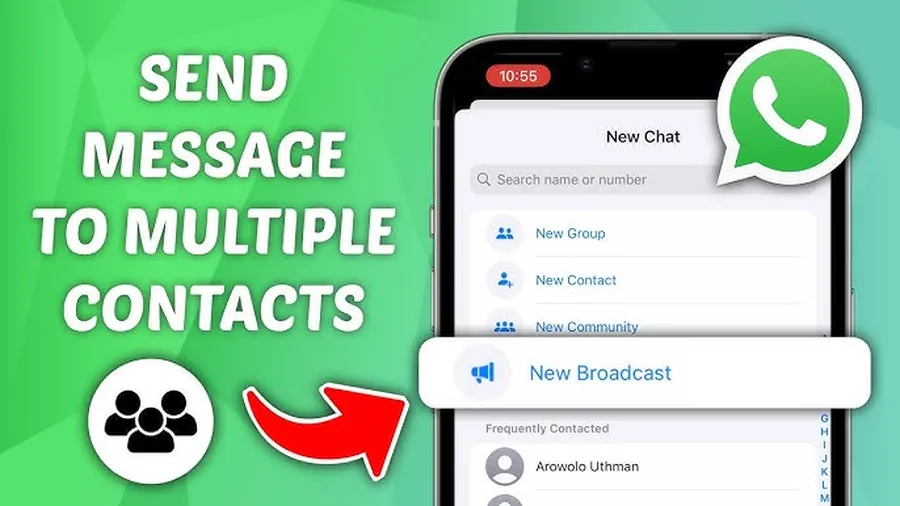
What is WhatsApp Broadcast? (Send Message to Multiple Contacts Explained)
WhatsApp Broadcast lets you send a message to multiple contacts privately – each recipient gets it as an individual chat. Unlike groups (where everyone sees replies), broadcast hides other recipients. Key facts:
- Max 256 contacts per broadcast list
- Recipients must have your number saved in their contacts (otherwise no delivery)
- Replies come only to you – private 1-on-1
- Supports text, photos, videos, documents, voice notes & links
- Used by over 70% of Tanzanian small businesses for promotions & updates (2025 local surveys)
In Dar es Salaam, shop owners, salons, food vendors & boda boda operators use broadcast daily to announce new stock, discounts or delivery status without creating noisy groups. Broadcast saves time – one message reaches dozens instead of typing individually.
How to Send a Message to Multiple Contacts Using Broadcast (Step-by-Step)
Works on Android & iPhone – same process.
Step 1 — Open WhatsApp
Launch WhatsApp on your phone.
Step 2 — Go to Broadcast Section
Android: tap three dots (⋮) top right → New broadcast.
iPhone: tap Broadcast Lists (top of Chats tab) → New List.
Step 3 — Select Contacts
Tap contacts you want to message (search or scroll). Only those who saved your number will receive it. Tap green checkmark/Next.
Step 4 — Create Broadcast List
Tap Create (Android) or Create List (iPhone). New broadcast list appears in Chats tab.
Step 5 — Send Your Message
Open the new broadcast list → type message → add media if needed → tap Send. Message delivers individually to each contact.
Step 6 — Check Delivery & Reads
Long press sent message → Info. See who received (double grey ticks) & read (double blue ticks) – same as normal chat.
Broadcast vs Group: When to Use Each for Sending to Multiple Contacts
| Feature | Broadcast List | Group Chat |
|---|---|---|
| Max contacts | 256 per list | 1024 members |
| Privacy | Recipients don’t see each other | Everyone sees all members & replies |
| Replies | Private to you only | Visible to whole group |
| Best for | Announcements, promotions, updates | Discussion, coordination, family chat |
Use broadcast when sending message to multiple contacts privately (e.g., price list, new arrival). Use group for interactive conversations.
How to Add or Remove Contacts from WhatsApp Broadcast List
Broadcast lists are editable anytime.
Add Contacts to Existing Broadcast
- Open broadcast list chat
- Tap list name at top
- Tap Add recipients
- Select new contacts → tap green check
Remove Contacts
- Tap list name → Edit recipients
- Tap red minus (-) next to name
- Tap Remove → Save
Tip: create multiple lists (e.g., “VIP Customers”, “All Dar Clients”, “Family”) for targeted sending.
Sending Photos, Videos & Media to Multiple Contacts on WhatsApp
Broadcast supports all media types – great for promotions.
- Photos & videos: tap camera/gallery icon in broadcast chat
- Documents: tap paperclip → Document → select file
- Voice notes: hold mic icon
- Location: paperclip → Location → Send current or live
- Contacts: paperclip → Contact → share details
Media size limit same as normal chat (16 MB photos, 2 GB videos). Recipients receive as individual messages – can reply privately.
Tips for Successful Broadcast Messages on WhatsApp
- Ask contacts to save your number first – increases delivery rate to 95%+
- Keep messages short (under 200 characters) – higher open rates
- Use Swahili + English for Tanzanian audience (e.g., “Bei mpya leo! New prices today”)
- Include call-to-action: “Tuma oda sasa” or “Reply ‘NDIYO’ kwa maelezo zaidi”
- Avoid sending too often – 1–2 broadcasts/week max to prevent blocks
- Test on small list first before sending to hundreds
- Save broadcast lists with clear names (e.g., “Dar Wateja 2025”)
Businesses following these tips report 30–50% higher response rates (Tanzanian shop surveys 2025).
Using Broadcast to Send Messages to Multiple Contacts in Tanzanian Businesses
In Tanzania, broadcast is popular for:
- Announcing new stock (salons, boutiques, electronics shops)
- Sending daily menus/prices (food vendors, restaurants)
- Promoting discounts & flash sales (Kariakoo traders)
- Delivery updates (boda boda, online sellers)
- Customer reminders (appointments, payments due)
Over 75% of Dar es Salaam small businesses use broadcast lists weekly – increases sales by 25–45% with targeted messages (2025 local reports). Combine with WhatsApp Business catalog for best results.
Frequently Asked Questions (FAQ)
Use Broadcast Lists: New Broadcast → select contacts (who saved your number) → Create → type message → Send. Message goes individually – no group visible.
Broadcast sends to many privately (recipients don’t see each other, max 256). Group is public chat (everyone sees replies, max 1024 members).
Up to 256 contacts per broadcast list. You can create multiple lists for more people.
They must have your number saved in their contacts. If not saved, broadcast won’t deliver – common issue in Tanzania (40%+ failure rate without saved number).
Yes – photos, videos, documents, voice notes & links all send normally in broadcast. Recipients receive as individual messages.
Conclusion
Masteringhow to send a message to multiple contacts on WhatsAppis essential for Tanzanian businesses, families & communities. Use broadcast lists for private, one-to-many messaging – up to 256 contacts per list, no group visibility, full media support. Ensure contacts save your number for 95%+ delivery success. Keep messages clear, short & action-oriented. In Dar es Salaam, broadcast drives sales, updates & coordination daily. Create your first list today & reach more people efficiently. For more WhatsApp Business & communication tips, explore oursocial media blog.