Page Outline
- Quick Answer
- Why Custom Software Matters for Small Businesses
- What Custom Software Development Means
- Who This Guide Is For
- Market Data: Why Digital Systems Matter
- Examples of Custom Software for Small Businesses
- Custom Software vs Ready-Made Software
- When a Small Business Actually Needs Custom Software
- Business Benefits
- Cost and Budget Planning
- Development Process
- Features to Build First
- Security, Data and Maintenance
- Mistakes to Avoid
- Decision Checklist
- FAQs
- Final Advice
Quick Answer: What Is Custom Software Development for Small Businesses?
Custom software development for small businesses means building a digital system around the exact way a business works. Instead of forcing your team to fit a generic app, the software is designed for your bookings, stock, customers, invoices, reports, staff tasks, payments, approvals, or daily operations.
It is worth considering when your business is losing time in spreadsheets, WhatsApp follow-ups, duplicate data entry, paper records, manual reports, or tools that do not talk to each other. The best approach is not to build everything at once. Start with one painful workflow, launch a small version, test it with real users, then improve it step by step.
Why Small Businesses Are Looking for Custom Software
Most small businesses do not wake up one day and decide they need software. The need usually appears slowly. First, a spreadsheet becomes too big. Then customer follow-ups are missed. Stock numbers stop matching reality. Staff members ask the same questions every day. A manager spends nights preparing reports that should take five minutes.
That is where custom software becomes useful. It is not about looking “modern” or buying technology for the sake of it. It is about removing repeated work, reducing mistakes, improving visibility, and giving the business owner a clearer way to manage operations.
At Waridi Tech, we look at custom software from a practical business angle: what is the problem, who uses the system, what data matters, what should be automated, and what result will make the investment worth it?
What Custom Software Development Means
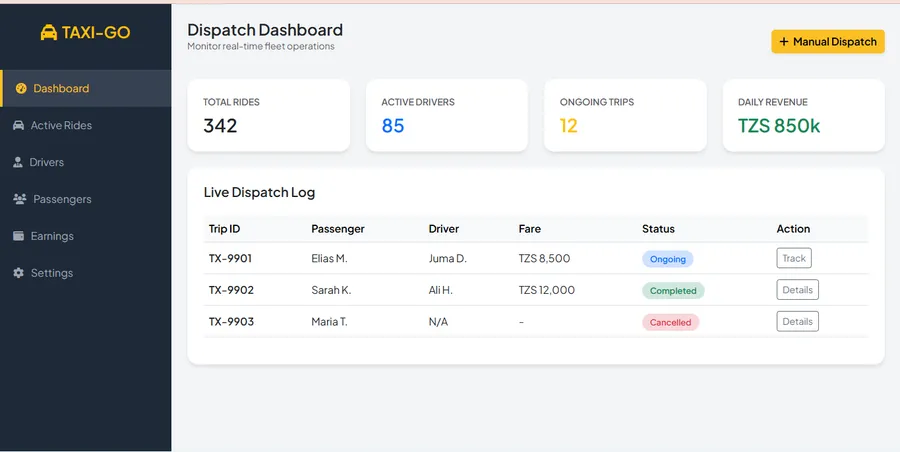
Custom software development is the process of planning, designing, building, testing, launching and maintaining software made for a specific business need. It can be a web system, mobile app, desktop app, dashboard, customer portal, booking system, inventory tool, school system, clinic system, hotel system, CRM, POS or internal automation tool.
The word “custom” does not mean complicated. It simply means the system is shaped around your workflow. A small business may only need a simple web dashboard that tracks clients and payments. Another may need a full system with user accounts, reports, SMS notifications, payment records, staff roles and admin approvals.
| Software Type | What It Helps Manage |
|---|---|
| CRM system | Leads, customers, follow-ups, sales pipeline and communication history. |
| Inventory system | Stock levels, purchases, sales, alerts, branch records and reports. |
| Booking system | Reservations, availability, payments, customer details and confirmations. |
| Business dashboard | Revenue, expenses, tasks, performance, staff activity and daily summaries. |
Who This Guide Is For
This guide is for small business owners, managers, founders and teams who are asking questions like:
- Should we continue using spreadsheets or build a system?
- Is custom software too expensive for a small business?
- What kind of software can help us reduce manual work?
- Should we choose a ready-made tool or build something specific?
- How do we start without wasting money?
It is also useful for businesses in tourism, hotels, schools, clinics, shops, agencies, real estate, transport, professional services and local service businesses that need a cleaner way to manage daily operations.
Market Data: Why Digital Systems Matter for Small Businesses
Small businesses are not a small part of the economy. The World Bank Group notes that small and medium enterprises represent around 90% of businesses and account for more than half of global employment. That means even small improvements in how these businesses operate can affect jobs, customer service and growth.
The challenge is that many small businesses still use disconnected tools. The OECD highlights that the digital adoption gap becomes bigger when technology is more advanced, especially around ERP, CRM, supply chain management, big data analytics and cloud computing. In simple language, small businesses often use basic apps, but struggle to connect their operations into one clear system.
Tool overload is also real. The Salesforce Small Business Trends report reports that 88% of SMB leaders feel overwhelmed by too many business tools. That is one reason custom software can be valuable: it can reduce tool fatigue by combining the most important workflows into a single system.
For Tanzania and other mobile-first markets, digital growth is already visible. DataReportal’s Digital 2026 Tanzania report estimates 20.6 million internet users in Tanzania in October 2025 and says mobile connections increased by 13 million between the end of 2024 and the end of 2025. For local businesses, this means customers, staff and managers are increasingly reachable through digital channels.
What this means: custom software is not only for big companies. Small businesses are already operating in a digital environment. The businesses that organize their data, customer communication, reporting and operations early are usually better prepared to grow.
Examples of Custom Software for Small Businesses
The best custom software starts from a real business problem. Below are common examples that can be built as simple MVPs first, then expanded as the business grows.
1. Booking and Reservation System
A booking system helps businesses manage reservations, availability, customer details, payment status, confirmations and calendar views. It is useful for hotels, tours, clinics, rentals, consultants, events and service businesses.
Related service: website development and booking platforms.
2. Sales and Customer Follow-Up System
This works like a simple CRM. It stores leads, inquiries, customer notes, follow-up dates, deal status and communication history. For a business owner, it becomes easier to see which leads need attention and which staff member is responsible.
3. Inventory and Stock Management System
Small shops, pharmacies, spare parts stores, restaurants and suppliers often lose money because stock information is unclear. A custom stock system can track purchases, sales, low-stock alerts, branches, suppliers and profit reports.
4. School, Clinic or Organization Management System
A school may need student records, fee tracking, attendance and parent communication. A clinic may need patient records, invoices, appointments and reports. These are not always solved well by generic tools, especially when local workflows are unique.
Related service: custom business system development.
5. Reporting Dashboard
A dashboard pulls key numbers into one view: revenue, orders, inquiries, stock, pending payments, staff activity or project progress. This helps the owner make decisions without waiting for manual reports.
Custom Software vs Ready-Made Software
Ready-made software is not bad. In fact, many small businesses should start with ready-made tools when the workflow is simple. Custom software becomes more useful when the business has a specific process, repeated manual work, unique reporting needs or multiple tools that need to work together.
| Option | Best When |
|---|---|
| Ready-made software | You need a quick solution and your workflow is close to the tool’s default features. |
| Custom software | Your workflow is specific, manual work is costly, or you need control over data and reports. |
| Hybrid approach | You use ready-made tools but need custom integration, dashboard or automation between them. |
A good software developer should not push custom software for every situation. Sometimes a small business only needs a clean website, a better form, a CRM setup, or automation between existing tools. The goal is to choose the solution that solves the problem with the least waste.
When a Small Business Actually Needs Custom Software
A small business should consider custom software when the cost of not having a system becomes higher than the cost of building one. This cost may show up as lost leads, stock mistakes, late reports, duplicate work, customer delays or poor visibility.
Practical signs you are ready
- Your team enters the same information in more than one place.
- You spend hours every week preparing reports manually.
- Customers ask for updates that your team cannot answer quickly.
- Stock, bookings, payments or tasks are hard to track.
- Your current software forces you to change your business process too much.
- You use more than five tools but still do not have one clear view of the business.
- You need roles, permissions and approvals to control who can see or edit data.
Simple rule: if a repeated task takes more than 5–10 hours per week, or one mistake can cost serious money, it is worth checking whether a custom system or automation can reduce that pressure.
Benefits of Custom Software Development for Small Businesses
1. Less Manual Work
Custom software can automate repeated tasks such as sending confirmations, calculating totals, generating reports, updating stock, assigning tasks or reminding staff about follow-ups. The goal is not to replace people; it is to remove unnecessary repetition so people can focus on useful work.
2. Better Data and Reporting
When business data is scattered across notebooks, spreadsheets and WhatsApp chats, decisions become slower. A custom system can bring key data into one place and show daily, weekly or monthly reports.
3. A Workflow That Fits Your Business
Every business has small details that make it different. A tour company, clinic, school, hotel and shop may all need customer records, but the workflow is not the same. Custom software respects those differences.
4. Better Customer Experience
Customers do not care whether a business uses a spreadsheet or a system. They care about fast responses, correct information, clear invoices, smooth bookings and reliable service. Good software helps your team serve customers with fewer delays.
5. Long-Term Scalability
A well-built system can start small and grow. You can begin with one module, such as booking or inventory, then add payment tracking, dashboards, notifications, staff roles or mobile access later.
How Much Does Custom Software Cost for a Small Business?
There is no single price for custom software because the cost depends on scope, features, users, design complexity, integrations, security needs, reports, hosting and long-term maintenance. A simple internal tool is not priced the same as a full business platform with customer accounts, payment records and multiple dashboards.
| Project Level | Typical Scope | Planning Range |
|---|---|---|
| Starter MVP | One workflow, few users, simple dashboard. | Lower budget |
| Small business system | Login, roles, forms, reports, notifications. | Medium budget |
| Integrated platform | Multiple modules, payments, APIs, advanced reports. | Higher budget |
For many small businesses, the smartest path is to avoid a huge first version. Build the smallest useful system first. If the MVP saves time, reduces mistakes or improves revenue visibility, then expand it with confidence.
Questions that affect the price
- How many user roles are needed?
- Will the system be web-based, mobile, desktop or all three?
- Does it need payment integration, SMS, WhatsApp, email or API connections?
- How many reports and dashboards are required?
- Will old data need to be imported?
- What level of security and backup is required?
The Custom Software Development Process
A clear process protects the business from wasted time and unclear expectations. Here is a simple process that works well for small businesses.
Step 1: Understand the Business Problem
The first step is not coding. It is understanding the real problem. What is slow? What causes mistakes? What information is missing? What does the owner need to see every day?
Step 2: Map the Workflow
A workflow map shows how information moves from one person or department to another. This prevents building software that looks nice but does not match the real work.
Step 3: Define the MVP
The MVP is the first useful version. It should include the features needed to solve the main problem, not every idea the business may need in the future.
Step 4: Design and Build
The developer creates the interface, database, user roles, forms, dashboards, reports and core logic. For small businesses, simplicity is important. Users should understand the system without long training.
Step 5: Test With Real Users
Testing should use real business examples: real orders, real customers, real stock items, real bookings or real invoices. This reveals problems before launch.
Step 6: Launch, Train and Improve
After launch, the team needs training and support. Feedback should be collected, then improvements should be prioritized based on business value.
For web-based systems, see our web development services. For mobile-first access, explore mobile app development. For offline or office-based use, see desktop application development.
Features Small Businesses Should Build First
The best first features are the ones that reduce daily pressure. A system does not need to start with advanced AI, complicated graphs or too many modules. Start with the features that make work clearer.
| Feature | Why It Matters |
|---|---|
| User roles | Controls what admin, staff and managers can view or edit. |
| Forms | Collects clean data instead of scattered notes and chats. |
| Dashboard | Shows the most important numbers in one place. |
| Reports | Helps owners understand sales, stock, payments or performance. |
| Notifications | Reminds staff or customers through email, SMS or WhatsApp where needed. |
Once the core system works, more advanced features can be added: customer portals, payment integrations, analytics, API connections, document generation, backup automation or AI-assisted workflows.
Security, Data and Maintenance
Security matters even for small businesses. A small business may store customer names, phone numbers, payments, staff records, medical notes, student records or invoices. Losing that data can damage trust.
Basic security requirements
- Strong login and password rules
- User roles and permissions
- Regular backups
- SSL/HTTPS on web systems
- Audit logs for important actions
- Input validation to reduce errors and abuse
- Maintenance plan for updates and bug fixes
A custom system should also have a clear ownership plan. The business should know who owns the data, where it is hosted, how backups work, what happens if the system is down, and how future improvements will be handled.
Common Mistakes to Avoid
1. Building Too Much Too Early
Many projects fail because the first version is too big. A small business should not try to copy an enterprise platform in the first phase. Start with the workflow that creates the most pressure.
2. Ignoring Staff Who Will Use the System
Owners may understand the business goal, but staff understand daily friction. Before building, ask the people who handle customers, stock, bookings, payments or reports every day.
3. Choosing Features Without Business Value
Not every feature is worth building. A feature should save time, reduce errors, improve revenue visibility, improve customer service, or support growth.
4. Forgetting Maintenance
Software is not a one-time poster or brochure. It needs hosting, updates, backups, bug fixes and sometimes new features. Maintenance should be discussed before development starts.
5. Not Measuring Results
A business should know what success looks like. For example: reduce report preparation from 4 hours to 20 minutes, reduce missed follow-ups by 80%, or make daily sales visible before closing time.
Checklist: Should Your Small Business Build Custom Software?
Use this checklist before paying for development.
- We have a clear business problem, not just a general desire for an app.
- The problem happens often enough to justify investment.
- Current tools do not solve the workflow properly.
- We know who will use the system daily.
- We can describe the first version in simple terms.
- We have someone responsible for giving feedback during development.
- We understand that maintenance is part of the project.
If most answers are yes, custom software may be a good move. If the problem is still unclear, start with a consultation, workflow audit or smaller automation first.
FAQs: Custom Software Development for Small Businesses
What is custom software development for small businesses?
It is the process of building software around a small business’s actual workflow. It can manage customers, bookings, stock, invoices, reports, tasks, staff roles or other operations.
Is custom software better than ready-made software?
Not always. Ready-made software is better when your needs are simple and common. Custom software is better when your workflow is specific, repeated work is costly, or you need better control over data and reporting.
How long does it take to build custom software?
A simple MVP can take a few weeks. A larger system may take several months. The timeline depends on the number of features, user roles, reports, integrations and testing requirements.
Can a small business start with one module?
Yes. This is usually the best approach. Start with one module such as bookings, stock, customer follow-up or reporting, then expand after users confirm it works well.
What are good examples of custom software for small businesses?
Examples include CRM systems, booking systems, inventory systems, POS systems, dashboards, school systems, clinic systems, hotel systems, invoice tools and staff task management systems.
Does custom software need a mobile app?
Not always. Many small businesses can start with a mobile-friendly web system. A mobile app becomes useful when users need offline access, phone features, push notifications or heavy daily mobile use.
How do I avoid wasting money on software development?
Start with a clear problem, build a small MVP, test with real users, avoid unnecessary features, agree on maintenance, and measure whether the system saves time or improves business control.
Final Advice
Custom software development for small businesses is not about building the biggest system. It is about building the right system. The right system removes repeated work, organizes important data, improves customer service, and helps the owner see what is happening without guessing.
Start small. Choose one workflow that matters. Build a useful first version. Let real users test it. Improve based on evidence. That approach is safer, cheaper and more effective than trying to build everything at once.
To discuss a practical system for your business, visit Waridi Tech custom business system development, explore our portfolio, or contact Waridi Tech for project guidance.